Your work apps go online only through your VPN
Kordon watches which address your chosen apps go online from - work systems, messengers, browsers, AI agents - and pauses them in a split second when the VPN drops or the address changes. For one computer and for a whole organisation.
Kordon right now
Kordon Cloud · liveKordon has its own cloud - Kordon Cloud, a server we wrote and run ourselves. The cloud runs the Telegram remote and sends alerts. This page publishes aggregate statistics only: no IP addresses, device names or Telegram account data.
Counted since November 4, 2026 from Kordon Cloud, refreshed every 5 minutes. Only computers linked to the Telegram bot are counted, so the real numbers are higher. What our server knows
News
What we send in the bot: plans, offers and new versions
It doesn't close apps, it freezes them
A kill switch inside the VPN client cuts the whole internet: the AI's answer breaks off, the agent fails with an error, everything has to be reopened. Kordon is precise: it touches only the apps you chose and doesn't close them, it freezes them. The network is back within 20 seconds - nothing is lost.
Watches the network
The OS tells Kordon about network, VPN tunnel or route changes. Plus an external IP check every 5 seconds and a check of the route to the AI services every 15 seconds.
Freezes
The chosen apps are paused with the system's own process pause and send nothing.
Resumes or closes
The right IP is back within 20 seconds - work continues. If not, the app closes and won't start until the address is allowed. The Telegram bot tells you either way.
What it does
AI services care where you come from. VPNs drop all the time - after sleep, on a Wi-Fi change, on reconnect - and in that second Claude or ChatGPT already send a request from your real address. And some VPNs quietly let part of the sites around the tunnel, and you'd never know.
Leak check
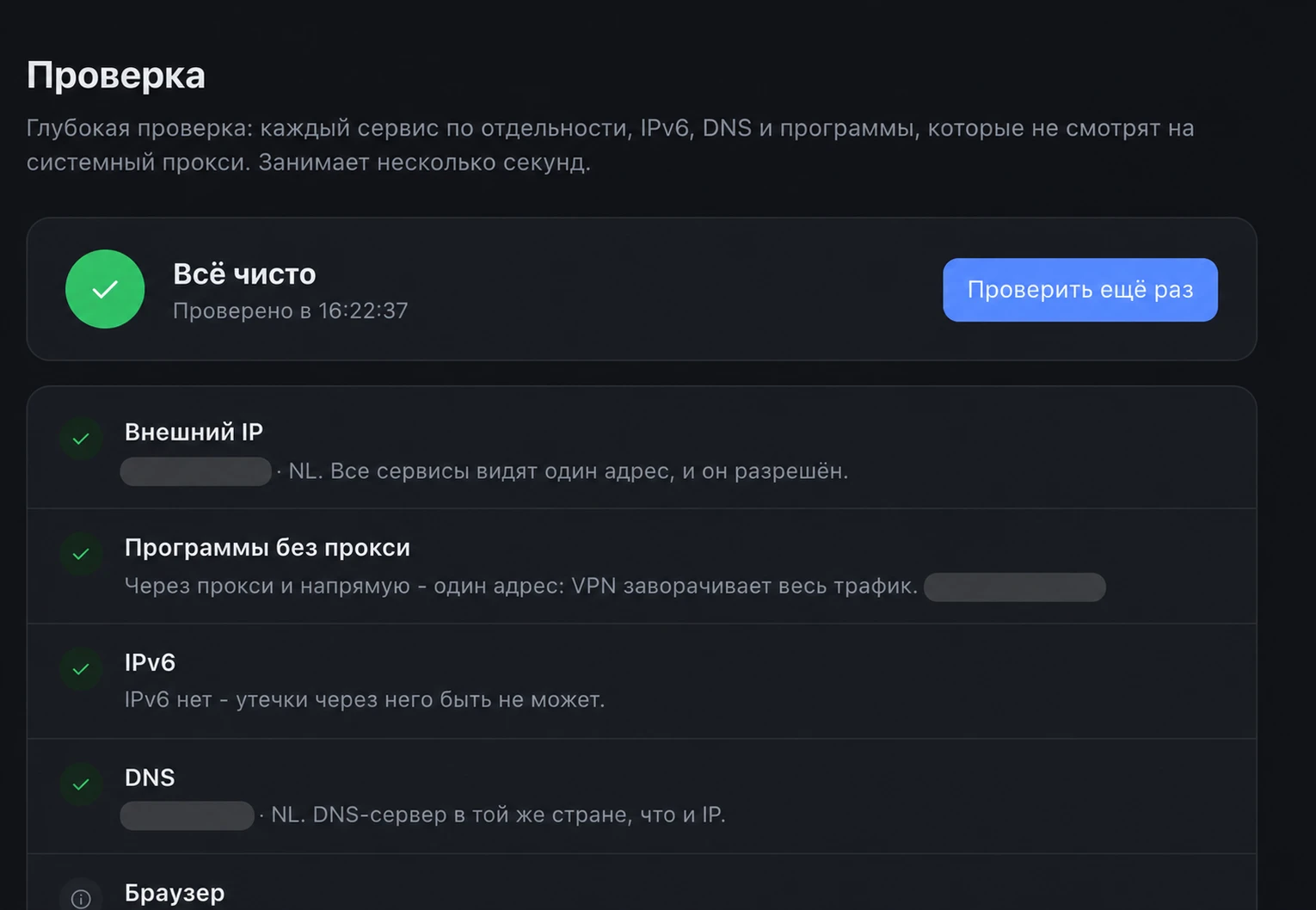
One button: do all services see one address, does IPv6 bypass the VPN, which country your DNS is in, and which address apps that ignore the proxy go out from: the terminal, git, Claude Code.
The route to the AI services themselves
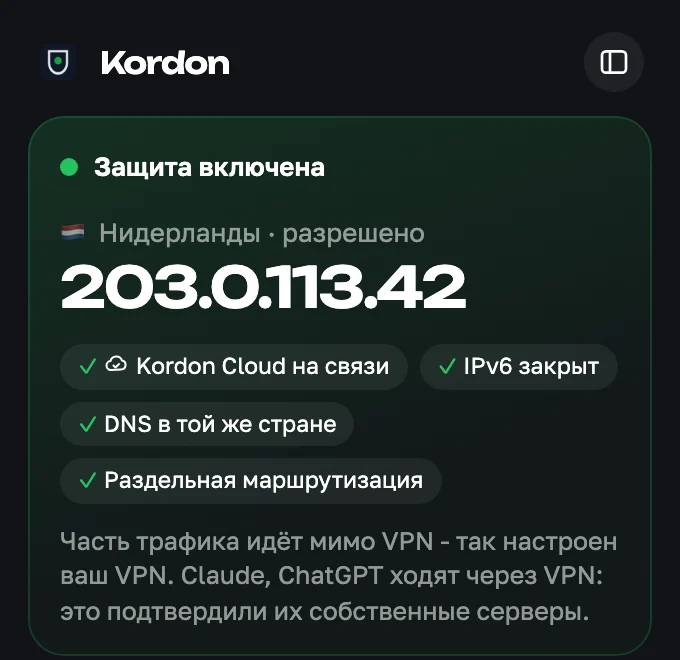
Kordon asks the servers of Claude, ChatGPT, Codex and Perplexity which address they see. It works with split routing and with a separate proxy or tunnel for AI: the server sees the VPN - the app runs, it sees your home address - pause, even if the "general" IP is right.
The whole process tree
Not only the app freezes, but everything it started: helpers, terminal commands, git and curl. Browsers freeze whole, with all tabs.
Rules per app
One may work from any EU country, another only from one country or one address. Trusted networks: at home without a VPN, on someone else's Wi-Fi Kordon watches again.
Browser extension
AI on the web? Only Claude, ChatGPT, Gemini and other AI tabs pause. Plus a WebRTC leak check. Installs from the Chrome Web Store in a couple of clicks and updates itself.
A window by the clock and a panel
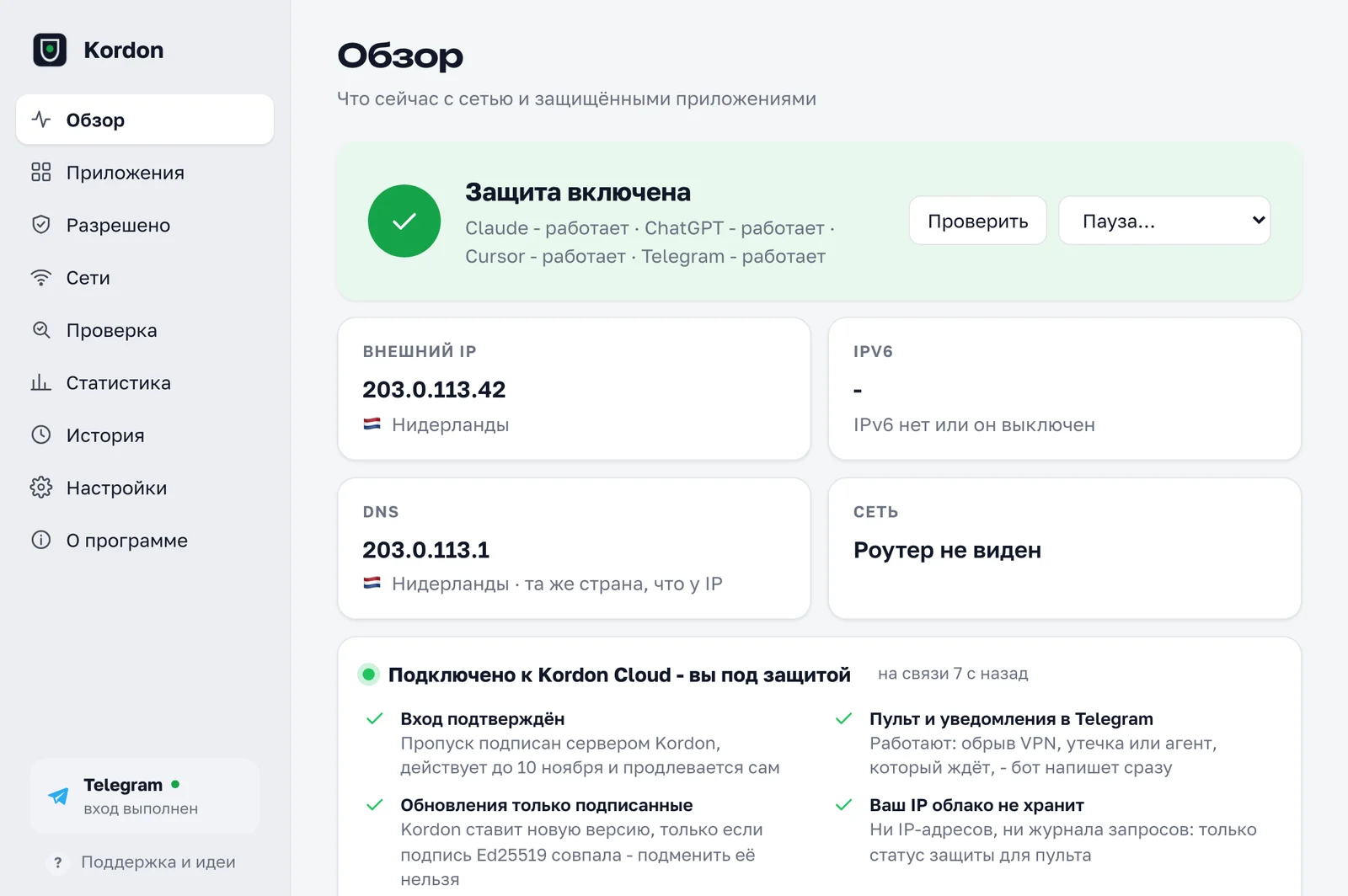
Click the icon - protection, country, IP and what's protected. The panel has rules, networks, history and stats: how often the VPN let you down and how often Kordon was in time.
One-click updates
A new version shows up in the window: what's new and an Update button. Every step shows, after the restart - Updated. Turn on auto-update and Kordon installs new versions itself while protected apps are closed.
New in 1.4.7
- Extension from the Chrome Web StoreA couple of clicks, no developer mode, updates itself. Chrome, Yandex, Edge, Brave and Comet.
- Clearer from the first runThe Overview shows what's left to set up: apps, country, sign-in, extension.
- No stuck apps on WindowsAfter a crash Kordon lifts all piled-up pauses, so the browser isn't left frozen.
- Terminal agents carry onCodex and Claude Code work as before after a pause, with no junk in the input line.
- Settings stay putDon't close apps, the reputation watch and network profiles survive a restart.
- Soon: corporate VPNAn app works only while ViPNet, Continent AP or Cisco AnyConnect is connected.
A remote in Telegram
Sign in with the Telegram bot once - and Kordon on all your computers is on your phone.
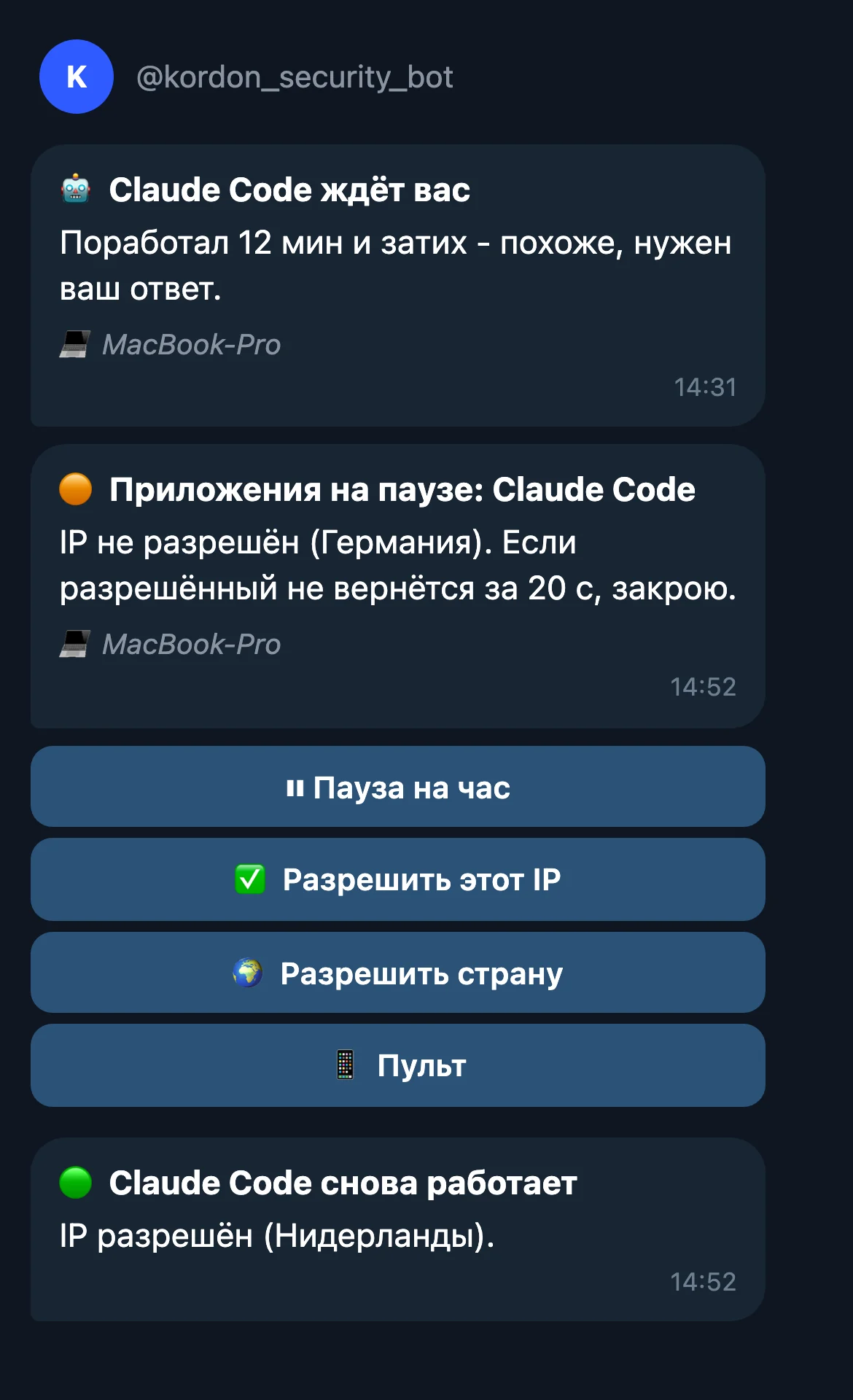
- "Claude Code is waiting for you"Left the agent working and went for coffee - the bot tells you when it has finished or gone quiet waiting for your answer. Only while you're away from the computer.
- The VPN dropped while you're awayA message right away, with buttons under it: pause for an hour, allow this IP or the country. The VPN blinked for less than 30 seconds - one quiet message instead of two.
- Only the alerts you wantYou choose: /notify in the bot, a button under any alert or the switches in the remote - VPN, agents, leaks, weekly summary. A leak is reported no more than once a day.
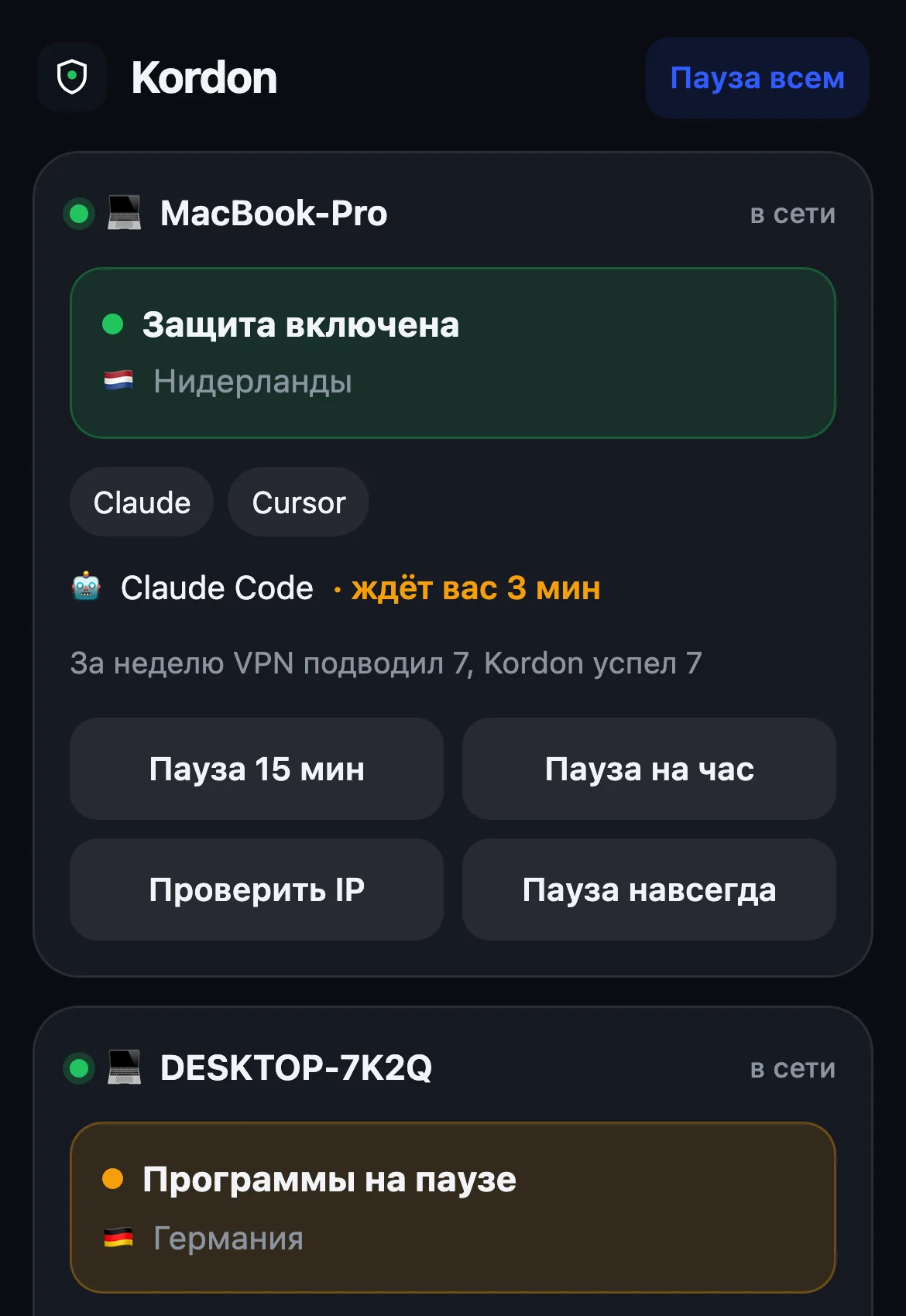
- All computers on one screenStatus, country, protected apps and what the agents are doing. Pause one computer or all at once.
How it differs
| VPN kill switch | Firewall | Kordon | |
|---|---|---|---|
| Touches only the apps you chose | no, cuts everything | yes | yes |
| VPN blinked - the app continues where it was | no | no, drops connections | yes, freeze |
| Sees when the VPN sends a site around the tunnel | no | no | yes, asks the service itself |
| Allow a whole country, not one address | no | no | yes |
| Catches IPv6 and DNS leaks | not always | no | yes |
| Works with proxy-mode VPN clients | depends | no | yes |
| Split routing and a proxy for AI | no | no | yes, checks the AI's own path |
| A remote and alerts on the phone | no | no | yes, in Telegram |
| No admin rights | not always | no | yes |
Trust and data
Kordon watches the network and stops apps, so it has to earn more trust than an ordinary utility.
- Apple Developer ID signatureThe Mac version is signed with an Apple Developer ID certificate and notarized by Apple: Kordon opens with a double click.
- Kaspersky and VirusTotalBoth scan every build before it's published. Kordon 1.5.1 for Windows and Mac: Kaspersky is clean. Links to the scans are in the release notes on GitHub.
- The file can't be swappedThe one-line install checks SHA-256 against the release and installs nothing if the file was tampered with. Updates come only from the releases on GitHub.
- Tested on a real WindowsBefore every release Kordon starts on Windows and opens its windows. A blank window stops the release.
What Kordon sends over the network
- Every 5 seconds asks several public services for your external IP and waits until two of them agree. Every 15 seconds and right after a network change asks the AI services of protected apps which address they see.
- Looks up the IP's country and makes one DNS query to see whose DNS your requests go through.
- Every 15 minutes checks the latest version number with our server, sending no data.
- Signing in with Telegram is required and done once: our server knows the chat number and the computer's name. While signed in, Kordon tells the remote every 15 seconds the status, country and app names - no IP addresses.
- Our server, Kordon Cloud, doesn't record IP addresses: the request log is off and the service itself never gets the address. One exception is the IP reputation check: when you press the button, the VPN address goes to the server to be matched against blocklists and is not stored.
No analytics, no ads, no stored IP addresses on our server. Settings and logs stay on your computer.
Honest limits
- Kordon works at the app level, not the network level: milliseconds pass between a network change and the freeze. If you need "not a single packet outside the VPN", also enable your VPN's own kill switch.
- Apps running as administrator and system services are left alone.
- It can't protect against malware on the same computer: that could simply stop Kordon.
- Kordon doesn't protect the phone: it runs on the computer, and Telegram is its remote.
How Kordon security works: the server, signatures, checking with OpenSSL →
Install
One line in a terminal or a file from the release page. No admin rights needed.
curl -fsSL https://raw.githubusercontent.com/ef1m03/kordon/main/scripts/install.sh | sh- Run the command in Terminal, or open the file and move Kordon to Applications
- Find the shield icon in the menu bar at the top of the screen
- Press Sign in with Telegram and confirm in the bot
- Pick the apps to protect and allow your VPN's country
irm https://raw.githubusercontent.com/ef1m03/kordon/main/scripts/install.ps1 | iex- Run the command in PowerShell, or the file. If Windows warns you, press More info and Run anyway
- Find the shield icon by the clock. If it isn't there, press the ^ arrow next to the clock
- Press Sign in with Telegram and confirm in the bot
- Pick the apps to protect and allow your VPN's country
curl -fsSL https://raw.githubusercontent.com/ef1m03/kordon/main/scripts/install.sh | sh- Run the command in a terminal
- Find the shield icon in the tray
- Press Sign in with Telegram and confirm in the bot
- Pick the apps to protect and allow your VPN's country
Plans from November 20, 2026
Kordon is fully free for now. Everyone using it before the start gets 14 days of Lite and 50% off the first payment within a month after the start.
- 1 device
- Full protection: IP, country, IPv6, DNS, WebRTC
- Browser extension
- Telegram remote and VPN alerts
- Everything in Lite, plus:
- 3 devices, up to 5 at 99 ₽
- Agent remote: answer Claude Code from your phone
- Alerts when Claude Code and Codex wait for you
- Ban insurance: a copy of Claude and ChatGPT chats
- Settings move to a new computer
- Automatic IP reputation checks
- 90-day VPN report and profiles by network
- Everything in Plus, plus:
- 10 devices and more at 99 ₽
- Shared rules, roles and log
- Admin alerts when a member's protection trips
- Remove a member in one click
- Corporate VPN: ViPNet and others - soon
Leak protection is the same on every plan. After the start - 3 free days for new users, card or SBP via YooKassa, cancel renewal any time. Terms - in the public offer. For organisations - Enterprise on request.
Questions
Is it a VPN?+
No. Kordon doesn't change your address or encrypt traffic. It watches which IP the chosen apps work from and pauses them if it's the wrong one. Works with any VPN or none.
How much is it?+
Free for now. From November 20, 2026 - plans from 149 ₽ a month: Lite - 1 device, Plus - 3 devices, the agent remote and ban insurance, Team - for teams. Everyone using Kordon before the start gets 14 days of Lite and 50% off the first payment within a month after the start. No ads.
Why sign in with Telegram?+
Signing in with the bot turns protection on and gives you a remote on your phone, VPN and AI agent alerts, and settings that move to a new computer. We see only the chat id and your Telegram name - no phone or IP addresses.
I use AI in the browser - will it help?+
Yes. Best is the Kordon extension from the Chrome Web Store for Chrome, Yandex Browser, Edge and Brave: only AI tabs pause. You can also protect a whole browser. Not Safari: its tabs live in shared macOS processes.
Which VPNs does it work with?+
Any: WireGuard, OpenVPN, corporate clients, system-proxy VPNs (v2rayN, Hiddify, Clash) and split routing, when some sites go around the VPN. Kordon doesn't plug into the VPN, it checks the result - which address the apps really go out from.
Kordon is made by EFIMOV DEV
We build websites, web services, apps and Telegram bots for businesses. Kordon is our own product: it's where we test what we later build for clients - one-click updates, testing on a real device before release and an honest account of which data goes where.
We built and shipped Kordon ourselves: Go, three systems, GitHub Actions builds, a Telegram bot and mini app, a browser extension. We build apps and services for clients the same way - starting with a free prototype.
- Goone codebase for Mac, Windows and Linux
- Telegrama bot, a mini app and a remote
- Chromean extension for AI tabs
- CIbuilds, antivirus scans and a Windows test run